Showing posts with label Ransomware. Show all posts

Thursday, 9 June 2016

Remove Payms ransomware - Completely Remove Payms ransomware From Your PC

What is Payms ransomware


Payms virus is yet another example of ransomware. This threat was created based on Jigsaw virus code, which is reportedly on sale in Dark Web forums for 139 USD. This virus encrypts victim’s files and demands 150 USD, but if the victim does not pay within 24 hours, the ransom price increases to 225 USD. However, it seems that cyber criminals ask for way smaller ransoms than they used to because computer users are already aware of ransomware threats, and also the majority of them refuse to pay the ransom.
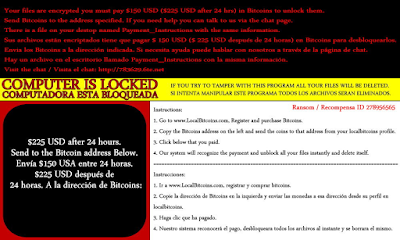

Payms ransomware adds .pay, .payms or .paymst file extensions to encrypted files, and leaves ransom notes in the computer system, called Payment_Instructions.txt. You can find a copy of this file on the desktop, as well as in all folders that contain some encrypted data. The ransom note informs the victim that all data on the computer has been encrypted, and there is no other way to decrypt it than to pay a ransom. The note is written in English and Spanish languages, and it also informs that if the victim attempts to tamper with the virus, all files will be deleted. It provides instructions on how to buy Bitcoins and says that the victim must transfer them to a provided address if he/she wants to access his/hers files ever again. According to crooks, they will eliminate the virus and decrypt the data after the payment is made.

Payms Ransomware – Distribution


Payms ransomware can distribute via a couple of ways. Your computer could get infected with the crypto-virus through spam e-mails which have an attachment with malicious code inside them. If the attachment is opened, malware might be injected inside your computer system. The file possibly has a name such as firefox.exe or something similar, so to try and trick you.

Past variants of the presently named Payms ransomware were delivered through social media sites and some file-share system, too. DropBox could still be a way of distribution as the original variant of the ransomware used that as well. Avoiding all suspicious files, links, and websites is a highly recommended action as there you might find malware such as this one.


Tuesday, 7 June 2016

Remove JuicyLemon Ransomware Virus Easily From Your Computer

Do you know what JuicyLemon Ransomware is?


JuicyLemon Ransomware is an obnoxious infection that can slither into your Windows operating system without any warning. According to our research, this malicious threat is currently spread using the Angler Exploit Kit, and its executable is either downloaded in %APPDATA% or %TEMP% folders. This .exe file is represented with an icon of a purple folder, and its name is misleading (e.g., WebCam.exe) to make it more difficult for you to detect and delete it. If you remove JuicyLemon Ransomware file before it initiates file encryption, you might be able to stop all malicious processes. Unfortunately, because this threat is spread silently, most users realize that it is active only after their personal files get encrypted. When that happens, the malicious ransomware automatically deletes itself, and there is little to be done. Of course, there are things that need to be discussed, and we suggest reading this report.


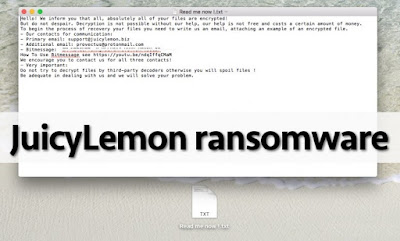
According to our research, JuicyLemon Ransomware is a fairly new infection, and we are hopeful that not many users have fallen victim to it. It is extremely important to keep yourself guarded against this threat because it can encrypt personal files, and this is one of the worst things that can happen because decrypting these files is often impossible. Once the ransomware is done encrypting files, it creates a text file on the Desktop with a completely random name (e.g., P1AD0H2NPVY3MARJT.txt). This text file represents the demands of the creators of this malicious ransomware. Users are instructed to contact cyber criminals via one of the available emails (support@juicylemon.biz or provectus@protonmail.com) or using the Bitmessage system. Once you communicate with cyber criminals – and you should not do that using your main email address – you will receive additional instructions on how to pay a ransom. Whether the ransom demanded for the decryption services is small or big, you have to think carefully about paying it as there is a risk that your payment will be taken with nothing in return.


Remove Herbst Ransomware and Restore .herbst Encrypted Files

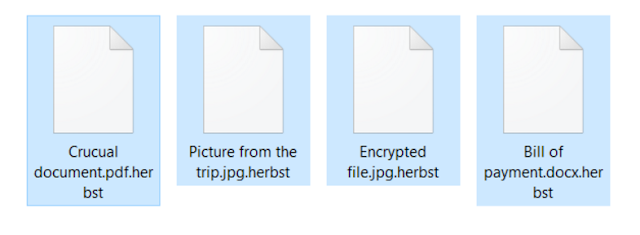
Herbst virus is detected as a vicious ransomware virus that ask you to pay for fake and unreliable software product. This ransomware trap your important files including, video, images, picture and after that you unable to access that particular locked files. All the time you see that some Herbst Ransomware virus pop-up get appear on the computer screen which will try to convince you to buy full version of software to unlock the same. As being a harmful ransomware program, Herbst virus keep on forcing you to purchase fake software. If you make payment for the said product, it never going to work. Herbst virus deceives users to pay ransom.


Ransom message shown by Herbst Ransomware


Your computer was just encrypted with the help of AES 256, against which any type of measures is useless, your data can be restored only with the help of a unique key. You can decipher the data yourself, but in today’s time, it would technically take 100 years.

This is why we won’t to as a not so big payoff for the decryption key. If you are agree to this proposal, we want to make you happy sooner, because our internet-database is limited in size and even if we do not want it, soon we will be driven into deleting your files.

After we have received the payment, we will send you a Transaction ID, which you need to paste in the text field and press on the button Decrypt.

File Types infected by Herbst Ransomware


“PNG .PSD .PSPIMAGE .TGA .THM .TIF .TIFF .YUV .AI .EPS .PS .SVG .INDD .PCT .PDF .XLR .XLS .XLSX .ACCDB .DB .DBF .MDB .PDB .SQL .APK .APP .BAT .CGI .COM .EXE .GADGET .JAR .PIF .WSF .DEM .GAM .NES .ROM .SAV CAD Files .DWG .DXF GIS Files .GPX .KML .KMZ .ASP .ASPX .CER .CFM .CSR .CSS .HTM .HTML .JS .JSP .PHP .RSS .XHTML .DOC .DOCX .LOG .MSG .ODT .PAGES .RTF .TEX .TXT .WPD .WPS .CSV .DAT .GED .KEY .KEYCHAIN .PPS .PPT .PPTX ..INI .PRF Encoded Files .HQX .MIM .UUE .7Z .CBR .DEB .GZ .PKG .RAR .RPM .SITX .TAR.GZ .ZIP .ZIPX .BIN .CUE .DMG .ISO .MDF .TOAST .VCD SDF .TAR .TAX2014 .TAX2015 .VCF .XML Audio Files .AIF .IFF .M3U .M4A .MID .MP3 .MPA .WAV .WMA Video Files .3G2 .3GP .ASF .AVI .FLV .M4V .MOV .MP4 .MPG .RM .SRT .SWF .VOB .WMV 3D .3DM .3DS .MAX .OBJ R.BMP .DDS .GIF .JPG ..CRX .PLUGIN .FNT .FON .OTF .TTF .CAB .CPL .CUR .DESKTHEMEPACK .DLL .DMP .DRV .ICNS .ICO .LNK .SYS .CFG” 

Herbst Ransomware even threatens you with a jail sentence, here you should always need to ignore the warning massage and never complete the payment within 48hours. Generally, this kind of ransomware virus propagate through online means. Herbst virus has been recently launched by the cyber criminals to generate illegal profit. It encrypts your all the system files including media files, documents, presentations and many other vital folders. Herbst virus will modifies the windows registry entries by its own codes and causes poor performance of the PC. Moreover, all confidential details of users used during the payment of ransom money will be gathered and will be used further for marketing purpose. Remove Herbst Ransomware virus immediately before it starts wreaking havoc on the system.


Saturday, 28 May 2016

How To Remove Ransomware Virus From Your PC - Complete Ransomware Removal Guide

What exactly is Ransomware?


As you may have concluded from its name, Ransomware is a malicious program that locks up some of the victimized users’ files and then demands ransom to be paid for unlocking them. It was first developed in Russia and since then has quickly spread worldwide. Ransomware is indeed so nasty that it has become an unpleasant issue for a great number of users ever since it first appeared.


Typical symptoms of a Ransomware infection


Unfortunately, Ransomware frightens the users all over the world so much mainly because when a user finds out their machine has been contaminated, it is usually too late.

The main symptom of a Ransomware infection is a strange full-screen message that appears on your computer screen, stating that some of your system’s files have been encrypted and you need to “purchase” an encryption key if you want them back. Also, it is possible that the whole encryption process uses up a lot of your device resources so that its performance is noticeably more sluggish.

Actually, this is the very moment when you can notice that something bad is going on with your computer. If you are experiencing a substantial slowdown, make sure that you check your Windows Task Manager. There on the top of the working applications, you may find one with an unrecognizable name. This is most probably Ransomware. On such conditions, turn off your system and consult a specialist or a removal guide like the one we have prepared for you below for further instructions.