Tuesday, 7 June 2016

Remove Herbst Ransomware and Restore .herbst Encrypted Files

Herbst virus is detected as a vicious ransomware virus that ask you to pay for fake and unreliable software product. This ransomware trap your important files including, video, images, picture and after that you unable to access that particular locked files. All the time you see that some Herbst Ransomware virus pop-up get appear on the computer screen which will try to convince you to buy full version of software to unlock the same. As being a harmful ransomware program, Herbst virus keep on forcing you to purchase fake software. If you make payment for the said product, it never going to work. Herbst virus deceives users to pay ransom.
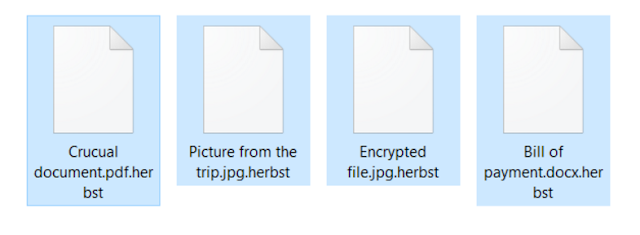

Ransom message shown by Herbst Ransomware


Your computer was just encrypted with the help of AES 256, against which any type of measures is useless, your data can be restored only with the help of a unique key. You can decipher the data yourself, but in today’s time, it would technically take 100 years.

This is why we won’t to as a not so big payoff for the decryption key. If you are agree to this proposal, we want to make you happy sooner, because our internet-database is limited in size and even if we do not want it, soon we will be driven into deleting your files.

After we have received the payment, we will send you a Transaction ID, which you need to paste in the text field and press on the button Decrypt.

File Types infected by Herbst Ransomware


“PNG .PSD .PSPIMAGE .TGA .THM .TIF .TIFF .YUV .AI .EPS .PS .SVG .INDD .PCT .PDF .XLR .XLS .XLSX .ACCDB .DB .DBF .MDB .PDB .SQL .APK .APP .BAT .CGI .COM .EXE .GADGET .JAR .PIF .WSF .DEM .GAM .NES .ROM .SAV CAD Files .DWG .DXF GIS Files .GPX .KML .KMZ .ASP .ASPX .CER .CFM .CSR .CSS .HTM .HTML .JS .JSP .PHP .RSS .XHTML .DOC .DOCX .LOG .MSG .ODT .PAGES .RTF .TEX .TXT .WPD .WPS .CSV .DAT .GED .KEY .KEYCHAIN .PPS .PPT .PPTX ..INI .PRF Encoded Files .HQX .MIM .UUE .7Z .CBR .DEB .GZ .PKG .RAR .RPM .SITX .TAR.GZ .ZIP .ZIPX .BIN .CUE .DMG .ISO .MDF .TOAST .VCD SDF .TAR .TAX2014 .TAX2015 .VCF .XML Audio Files .AIF .IFF .M3U .M4A .MID .MP3 .MPA .WAV .WMA Video Files .3G2 .3GP .ASF .AVI .FLV .M4V .MOV .MP4 .MPG .RM .SRT .SWF .VOB .WMV 3D .3DM .3DS .MAX .OBJ R.BMP .DDS .GIF .JPG ..CRX .PLUGIN .FNT .FON .OTF .TTF .CAB .CPL .CUR .DESKTHEMEPACK .DLL .DMP .DRV .ICNS .ICO .LNK .SYS .CFG” 

Herbst Ransomware even threatens you with a jail sentence, here you should always need to ignore the warning massage and never complete the payment within 48hours. Generally, this kind of ransomware virus propagate through online means. Herbst virus has been recently launched by the cyber criminals to generate illegal profit. It encrypts your all the system files including media files, documents, presentations and many other vital folders. Herbst virus will modifies the windows registry entries by its own codes and causes poor performance of the PC. Moreover, all confidential details of users used during the payment of ransom money will be gathered and will be used further for marketing purpose. Remove Herbst Ransomware virus immediately before it starts wreaking havoc on the system.



Ckl.assailantsmounts.com Popups Removal Guide - How to Remove Ckl.assailantsmounts.com Popups

It was about a week, I have been having problems with this Ckl.assailantsmounts.com pop-up virus. It took over my browser homepage after I updated chrome. Every time I open new tab, Ckl.assailantsmounts.com is there!! I have tried many ways to remove it but of no luck. Any help will be greatly appreciated!


What is Ckl.assailantsmounts.com pop-up?


Ckl.assailantsmounts.com pop-up is not a safe domain that keeps redirecting users to other dubious websites unexpectedly. Ckl.assailantsmounts.com is supported by ad-provided platform and causes lots of PC problems in the background. Generally speaking, Ckl.assailantsmounts.com can disguise to be an ad-supported extension and activates itself in the background automatically. Ckl.assailantsmounts.com pops up endless of annoying ads, coupons, fake update messages and also system errors. The popups flood into every page in Internet Explorer, Mozilla Firefox, Google Chrome and also Safari etc. When users are redirected to Ckl.assailantsmounts.com site, it is always a sign of adware attacks. Ckl.assailantsmounts.com is found to supported by nasty malware, especially adware, pop-up virus and even harmful trojan virus. With Ckl.assailantsmounts.com on the computer, the browser is the first inevitably victim of the infection. The default homepage settings are totally messed up. Unwanted extensions, toolbar and also plugins are inserted here and there. As long as the system is launched, Ckl.assailantsmounts.com pop-up begins to run. Any new tab users open will be Ckl.assailantsmounts.com instead of the desired site.

Ckl.assailantsmounts.com can pop up fake security alerts. Many users believe in those fake notifications such as browser update, windows update, security scan, flash player install notification and also other award notes. However, Ckl.assailantsmounts.com is working for cyber criminals to get revenue from every click and every malware promoted. What’s more, Ckl.assailantsmounts.com pop-up can exploit PC vulnerabilities and help hackers to remotely control the computers. During online browsing, Ckl.assailantsmounts.com will help to collect important information from users. To better prevent from further malware attacks and money loss, this Ckl.assailantsmounts.com pop-up should be removed completely without any delay.

What will Ckl.assailantsmounts.com pop-up do to damage the computers?


  • Ckl.assailantsmounts.com pop-up sneaks into the system and malfunctions the system severely.
  • Ckl.assailantsmounts.com pop-up slows down the PC performance severely.
  • Ckl.assailantsmounts.com pop-up redirects users to its domain and other dubious websites directly.
  • Ckl.assailantsmounts.com pop-up insets many rogue malware without asking permission.
  • Ckl.assailantsmounts.com pop-up generates a bunch of harmful vulnerabilities.


Remove Serve.adworldmedia.com Virus - Remove Serve.adworldmedia.com pop-up Infection

I have this browser Serve.adworldmedia.com and its really annoying. I just got this computer and I need to remove it. Can you please help me completely uninstall it? Thanks in advance.

Information about Serve.adworldmedia.com


Serve.adworldmedia.com is a malicious browser hijacker that is created to hijack your browsers like Mozilla Firefox, Google Chrome and Internet Explorer. Serve.adworldmedia.com can cause many problems on the targeted computers. Once it is installed on your system, it starts to change your default browser settings. Meanwhile, your homepage will be replaced by Serve.adworldmedia.com or its relative sites. Instead of providing you a great online experience, Serve.adworldmedia.com annoys you so much. If you make a search on it, you will always be redirected to some spam and fake websites. You should stay away from Serve.adworldmedia.com and remove it timely as soon as you detect it.

Apart from messing up all your browsers seriously, Serve.adworldmedia.com installs other malicious threats or unwanted applications to your system and as a result, your computer will work very slowly and all your browsers might freeze frequently. How can this virus get into one’s computer without making any chaos? In fact, Serve.adworldmedia.com is a tricky infection that can secretly infiltrate into the computers. People may get this Serve.adworldmedia.com virus infected when they visit some third party websites and click on some sponsored links. Besides, Serve.adworldmedia.com might be bundled with the free software. You should pay close attention when you install some programs from the Internet. Always keep in mind that it is not good to install any free software because often, a software installer includes optional installs, like Serve.adworldmedia.com. To avoid further damage, you have to remove Serve.adworldmedia.com immediately.

Serve.adworldmedia.com Overview


1. Serve.adworldmedia.com is a risky virus that penetrates into your system secretly;
2. Serve.adworldmedia.com can change your browser settings.
3. Serve.adworldmedia.com adds harmful files to major part of the system;
4. Serve.adworldmedia.com could cut off the access to the installed anti-virus software;
5. Serve.adworldmedia.com keeps updating all the time;
6. Serve.adworldmedia.com steals your privacy and compromises your security.


Remove ArcadeSoda ads Virus - Get Rid of ArcadeSoda ads from PC & Browser

Getting annoying pop-ups, on your browser then it can be an adware infection? Do you want to remove them, then here is the guide that can help you removing ArcadeSoda ads from your system.

Arcade Soda is an adware which is created by cyber criminals and it enters into the system silently without any information to user. Though it may seem helpful to user but it is harmful for any system. ArcadeSoda ads comes along with various freeware software and get installed automatically into your computer system. It will not let you to browse safely on web, and try to gather online activities that you are carrying on web. Whatever ads and pop-ups are brought up to you, are purely malevolent in nature, because these ineffective advertisements and pop-ups are product of cyber crooks. These online ads are basically meant to entice its online buyers, so that they can utilize it for future. But opposite to what they think, it dos not offer any effective wickeds. While working on Internet it is dreadfully important to keep your windows system secure from serious threats but most of the users are not aware from threats and they just download anything or click on unfamiliar links due to which they put themselves in trouble. So just strive to evade all such stuffs and eliminate ArcadeSoda ads from computer system as soon you notice it.


What Experts have to say about ArcadeSoda ads?


This threat is a rigorous threat designed by spammers which performs some malicious actions on compromised computer. Once it invades the Window system, gets automatically launches itself each and every time and undertakes fake computer scanning, Window login and show fake message to fright victims. It even disables the window security program, exploit vital files and make system useless to work or run it completely. Thus Experts of Windows computer system basically suggest the Manual process in the best way to delete ArcadeSoda ads infection for removing the errors and make the Windows PC in working conditions. 

As it is necessary that the user need to use the manual steps for removing the threats for which the users need to have technical skills. And if you are unaware of it and trying such kind of techniques for the first time then do not ever think of it and try it. The consequences of it can lead to damage of the entire parts of the Windows Computer System. As because the manual method is highly intricate and a single mistake or any affected files left and not uninstalled can simply spread itself and start to damage the system files. Furthermore this process does not assure that it totally uninstall the whole threat from your system. In sort it is very lengthy and time taking process thus requires a lot of patience. According to the experts automatic removal program can be efficient and effective way to solve any type of severe issues. Because of such effective features, powerful algorithm and scanning techniques the experts suggest that the computer users need to make use of this easy to use automatic Malware Scanner in order to completely remove malicious threats from the system.


Remove Mutfwwr244mutfwwr.xyz pop-up ads : Delete Mutfwwr244mutfwwr.xyz Virus From Your PC

If your web browser is randomly being redirected to the http://mutfwwr244mutfwwr.xyz/ advertisements then it is possible that your computer is infected with an adware program.


The “Mutfwwr244mutfwwr.xyz” adware program is bundled with other free software that you download off of the Internet. Unfortunately, some free downloads do not adequately disclose that other software will also be installed and you may find that you have installed adware without your knowledge.

Once this malicious program is installed, whenever you will browse the Internet, an ad from Mutfwwr244mutfwwr.xyz will randomly pop-up. These ads are aimed to promote the installation of additional questionable content including web browser toolbars, optimization utilities and other products, all so the adware publisher can generate pay-per-click revenue. Mutfwwr244mutfwwr.xyz is not a malicious domain however is used by cyber criminals to generate pay-per-click revenue.

When infected with this adware program, other common symptoms include:


  • Advertising banners are injected with the web pages that you are visiting.
  • Random web page text is turned into hyperlinks.
  • Browser popups appear which recommend fake updates or other software.
  • Other unwanted adware programs might get installed without the user’s knowledge.
  • You should always pay attention when installing software because often, a software installer includes optional installs, such as this Mutfwwr244mutfwwr.xyz adware. Be very careful what you agree to install.
  • Always opt for the custom installation and deselect anything that is not familiar, especially optional software that you never wanted to download and install in the first place. It goes without saying that you should not install software that you don’t trust.


Monday, 6 June 2016

HmClockDate32.exe Removal Guide - How to Uninstall HmClockDate32.exe from PC

I have Microsoft Security Essential, and it keeps detecting HmClockDate32.exe virus and there are two of them. I keep removing them but they keep coming back. I don’t download anything between the times i delete them. How can i remove the virus for good? Please help me! Thanks.

HmClockDate32.exe Description


HmClockDate32.exe is a very nasty Trojan infection. It usually enters your computer system by means of junk email attachments, malicious torrents and unverified programs. Once it gets inside your machine, it will cause a lot of trouble for you.


HmClockDate32.exe trojan infection


Lurking around in the background of your system, HmClockDate32.exe virus not only modifies Windows registry entries and browser settings without your permission, but also it corrupts your routine applications, especially antivirus tools. As a result, your computer will not be able to work properly. What’s more, this stinky HmClockDate32.exe virus can bring in many other malware/spyware and worms. If you cannot find an effective way to remove it completely, your machine will be filled with all kinds of dangerous viruses. At the same time, you may encounter big financial loss or identity theft.

Fortunately, there are still ways to eradicate this stupid HmClockDate32.exe virus. On one hand, you can remove it manually. On the other hand, if you are not familiar with computers and system tools, you can use Spyhunter to handle it. Here below I will teach you how to deal with HmClockDate32.exe virus.


HmClockDate32.exe Is Dangerous


  1. HmClockDate32.exe comes bundled with other viruses, such as Artemis!F96E402D2457
  2. HmClockDate32.exe incredibly slows down your system performance.
  3. HmClockDate32.exe can display annoying pop-up advertisements on your screen
  4. HmClockDate32.exe may hijack Web browsers, Web links, or cause redirect problems
  5. Computers infected by HmClockDate32.exe run like out of control
  6. HmClockDate32.exe reveals to hackers your financial details
  7. HmClockDate32.exe corrupts windows registry
  8. The removal of HmClockDate32.exe is not easy


How to Get Rid of 1-855-238-2046 Pop-up Virus Completely

Nowadays, there appears numerous computer helper claiming to protect the PCs and repair the existed problems here. 1-855-238-2046 Pop-up is one of them. After we check this items, we found that almost all of them are belong to the big family of popup and it is impossible for this thing to protect your PC and help you remove the issues here. On the reverse, you should thank god if these things wouldn’t get more issues happened on your PC.

Unlike any other malicious items, such as adware, freeware, or spyware, 1-855-238-2046 Pop-up is more aggressive. It is a full-time scam maker. When it appears, it brings a scam. It begins with a computer report and reveal the deep problems for several reasons. It purposes to trick you to take it as a security assistance. When you fall into its traps, it will require you to pay high price and then it will embed more issues inside.

1-855-238-2046 Pop-up comes from the suspicious application bundle and it can active the installment automatically once it gets inside the PC. When you download an application, you always gets a package of installment items. Some of them are for dangerous things. Users tend to keep clicking on “next step” without attention on the details. In this way, dangerous items sneak into the PC. Even you keep a close eye on the installment, you cannot avoid this because it can also get inside in other way only if you get the package. Therefore, we recommend you some guides to uproot 1-855-238-2046 Pop-up which will be more useful to our knowledge.